You’ve typed “sounds good” to your boss, your crush, and your best friend. Same two words. And for at least two of those people, the tone was completely wrong.
Your boss probably wanted something a little more polished. Your crush deserved something warmer. And your best friend? They would’ve been fine with just a thumbs-up emoji.
The words we choose are only half the message. The tone carries the rest. And most of us only have one or two tones we default to — which means we’re constantly over-formal with friends or too casual with colleagues.
What if you could switch tones as easily as picking a filter for a photo?
Meet the 13 tones of ReplyCraft AI
ReplyCraft AI comes with 13 distinct tones, each designed for a specific kind of conversation. Here’s every one of them:
1. Professional
Polished, suitable for work or formal contexts. Think emails to your manager, messages to clients, or anything where you need to sound competent and put-together.
2. Polite
Warm, respectful, and considerate. For when you need to be nice without being overly casual — talking to a neighbor, a teacher, or someone you don’t know well yet.
3. Friendly
Casual, approachable, and natural. How you’d talk to a coworker you actually like or a friend-of-a-friend at a party.
4. Witty
Clever, humorous, and engaging. For conversations where you want to be memorable and show some personality without trying too hard.
5. Empathetic
Compassionate, understanding, and supportive. When someone’s going through something tough and you want your reply to show you genuinely care.
6. Enthusiastic
Energetic, positive, and excited. Perfect for celebrating wins, hyping up plans, or responding to good news with matching energy.
7. Flirting
Playful, charming, and subtly flirtatious. For when you want to be smooth without being creepy — a fine line that this tone walks well.
8. Sarcastic
Sharp and ironic while still being funny. For your inner circle who gets your humor. Use with caution — sarcasm and text don’t always mix, but when they do, it’s gold.
9. Gen Z
Slang, internet lingo, short and expressive. If “no cap,” “slay,” and “bestie” are part of your vocabulary (or you wish they were), this one’s for you.
10. Optimistic
Bright, hopeful, and encouraging. For when someone needs a pick-me-up or when you want to frame things in the best possible light.
11. Persuasive
Confident, compelling, and convincing. When you need to make a case, pitch an idea, or get someone on board with your plan.
12. Critical
Direct, analytical, and constructively critical. For honest feedback, code reviews, or situations where sugarcoating would actually be unhelpful.
13. Romantic
Warm, affectionate, and heartfelt. For the person who makes your heart do the thing. Anniversary messages, love notes, or just a “thinking of you” that actually lands.
The showcase: one message, five completely different replies
Let’s take a real scenario. Someone sends you:
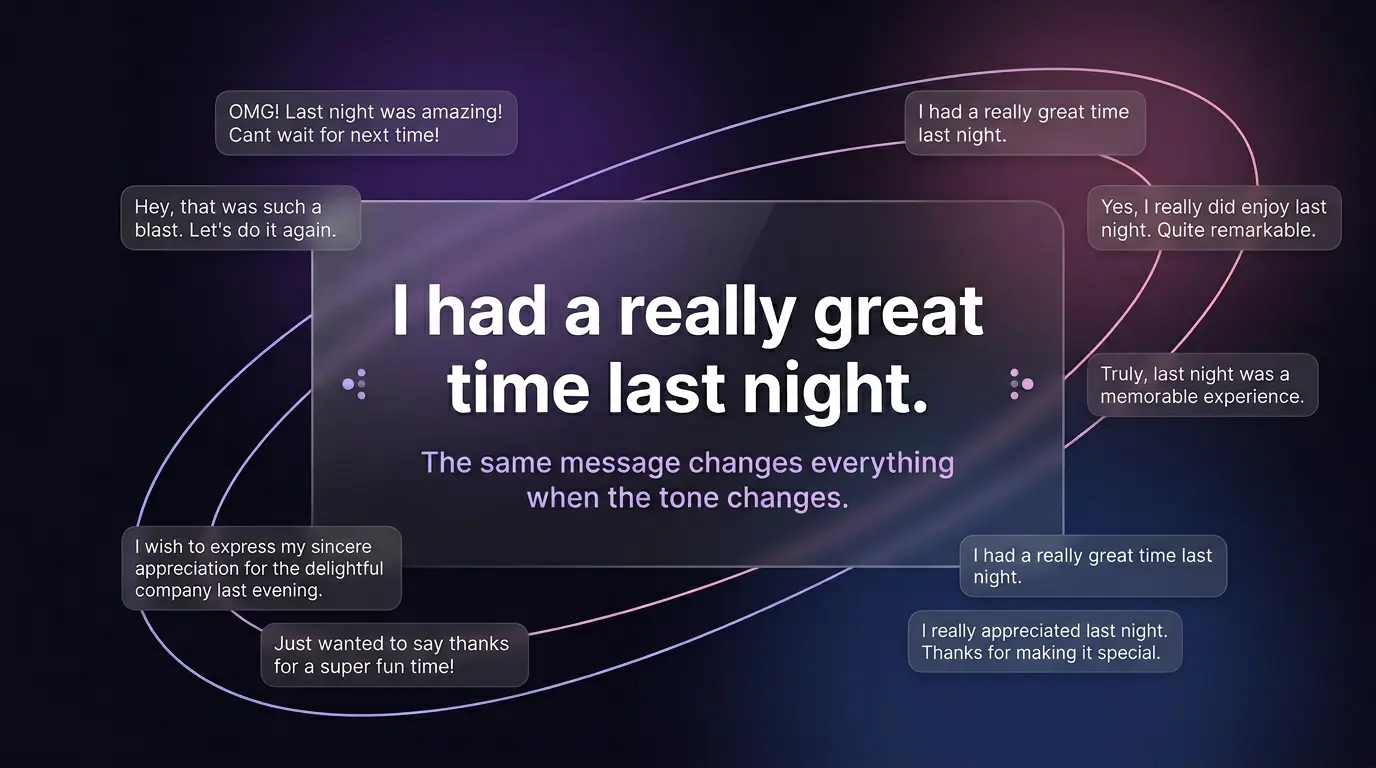
“I had a really great time last night!”
Here’s how five different tones handle the exact same message:
Professional
“I’m glad to hear that! It was a productive and enjoyable evening. Looking forward to the next one.”
Clean, appropriate, no ambiguity. Perfect if this was a work dinner or networking event.
Friendly
“Same here! We definitely need to do that again soon 😊”
Warm and casual. Keeps the good energy going without overthinking it.
Flirting
“Just great? I’d say it was pretty unforgettable 😏 When’s round two?”
Playful, confident, and leaves the door wide open. The kind of reply that makes someone smile at their phone.
Gen Z
“no bc literally same 😭🔥 that was elite fr fr”
Short, expressive, and exactly how half the internet actually talks. If this is your vibe, this is your tone.
Sarcastic
“Wow, ‘great time’? That’s the best review I get? I was going for ‘life-changing’ at minimum.”
Sharp, funny, and obviously joking. Only works if the other person gets your humor — but when they do, it’s perfect.
Same message. Five completely different conversations. That’s the power of tone.
When to use which tone — a quick guide
Knowing the tones exist is one thing. Knowing when to reach for each one is where it gets practical. Here’s a cheat sheet:
| Situation | Best tone |
|---|---|
| Replying to your manager | Professional |
| Comforting a friend | Empathetic |
| Group chat banter | Witty or Sarcastic |
| Texting your crush | Flirting or Friendly |
| Celebrating someone’s win | Enthusiastic |
| Giving honest feedback | Critical |
| Asking for a favor | Polite or Persuasive |
| Everyday friend chat | Friendly or Gen Z |
| Partner/spouse messages | Romantic or Friendly |
| Motivating someone | Optimistic |
| Sending a thank-you note | Polite |
| Pitching an idea | Persuasive |
| Reacting to memes | Gen Z or Sarcastic |
You don’t need to memorize this. After a few days of using ReplyCraft, you’ll instinctively know which tone fits each conversation.
Set a default tone per contact
Here’s something that saves a surprising amount of time: you can assign a default tone to each contact in ReplyCraft AI.
Your boss? Set them to Professional by default. Your best friend? Gen Z or Witty. Your partner? Romantic or Friendly.
Now every time you open a conversation with that person, ReplyCraft already knows the tone you want. No extra taps. No switching back and forth. Just replies that match the relationship from the start.
To set it up:
- Open Contacts in ReplyCraft
- Tap the contact
- Choose their default tone
- Done
You can always override it for individual messages — the default just saves you a step when 90% of your conversations with that person use the same tone anyway.
Why tone matters more than you think
We spend a shocking amount of time figuring out how to say something rather than what to say. The content of most messages is straightforward — it’s the delivery that trips us up.
Should I add an emoji? Is this too formal? Too casual? Will they think I’m being cold? Am I overusing exclamation marks?
These tiny decisions add up. They slow you down, drain your mental energy, and sometimes lead to messages that land completely wrong.
Having 13 tones at your fingertips doesn’t just speed things up — it gives you confidence. You pick the tone, and the AI handles the nuance. No second-guessing.
Try it for yourself
ReplyCraft AI is free to download and gives you 20 replies per day. That’s enough to see how different tones transform your conversations. Pick a message, try it in three or four tones, and you’ll never go back to one-size-fits-all replies.