Be honest — how many times today have you opened a message, read it, and then closed the app because you didn’t know what to say?
Maybe it was a work message you needed to think about. Maybe your crush sent something and you wanted to get the reply just right. Maybe a friend vented about something and you couldn’t find the words. Whatever it was, you read it, felt a tiny wave of stress, and put your phone down.
Now multiply that by every day of your life.
The texting problem nobody talks about
The average person sends over 70 messages a day. That’s across WhatsApp, iMessage, Slack, Instagram DMs, Telegram, and whatever else is pinging at you. Some of those messages are easy — “ok,” “haha,” “omw.” You fire those off without thinking.
But then there are the other ones.
The ones where your boss asks “Can you give me a quick update on the project?” and you need to sound competent without being long-winded. The ones where your client pushes back on a deadline and you need to be firm but not rude. The ones where someone you like sends something ambiguous and you draft seven different replies before settling on the worst one.
These “hard” messages might only be 10-15 a day. But each one costs you 3-5 minutes of mental gymnastics. That’s 30 to 75 minutes daily spent not on writing messages, but on agonizing over them.
Add in the easy messages, and you’re looking at roughly two hours a day spent in messaging apps. Two hours where your brain is constantly switching between conversations, contexts, and tones — all while pretending to pay attention to everything else in your life.
The hidden cost of overthinking replies
It’s not just the time. It’s the mental drain.
Every message you hesitate on is a tiny open loop in your brain. It sits there in the background — “I still need to reply to Sarah,” “I haven’t responded to that Slack thread,” “What do I even say to that?” — eating up your working memory while you try to focus on other things.
And here’s the kicker: after all that overthinking, you usually end up sending something mediocre anyway. You delete the clever reply because it felt like too much. You water down the honest reply because it felt too blunt. You settle for something safe and generic that doesn’t quite say what you meant.
All that time and energy, and the result is just… fine.
What if there was a better way?
Meet ReplyCraft AI
ReplyCraft AI is a reply assistant that does one thing really well: it takes any message you receive and gives you three ready-to-send replies in seconds.
No templates. No canned responses. Actual, contextual replies that sound like something you’d say — just better and faster.
Here’s the flow:
- You receive a message in any app — WhatsApp, Telegram, iMessage, Instagram, Slack, whatever
- Open ReplyCraft (or share the message directly to it)
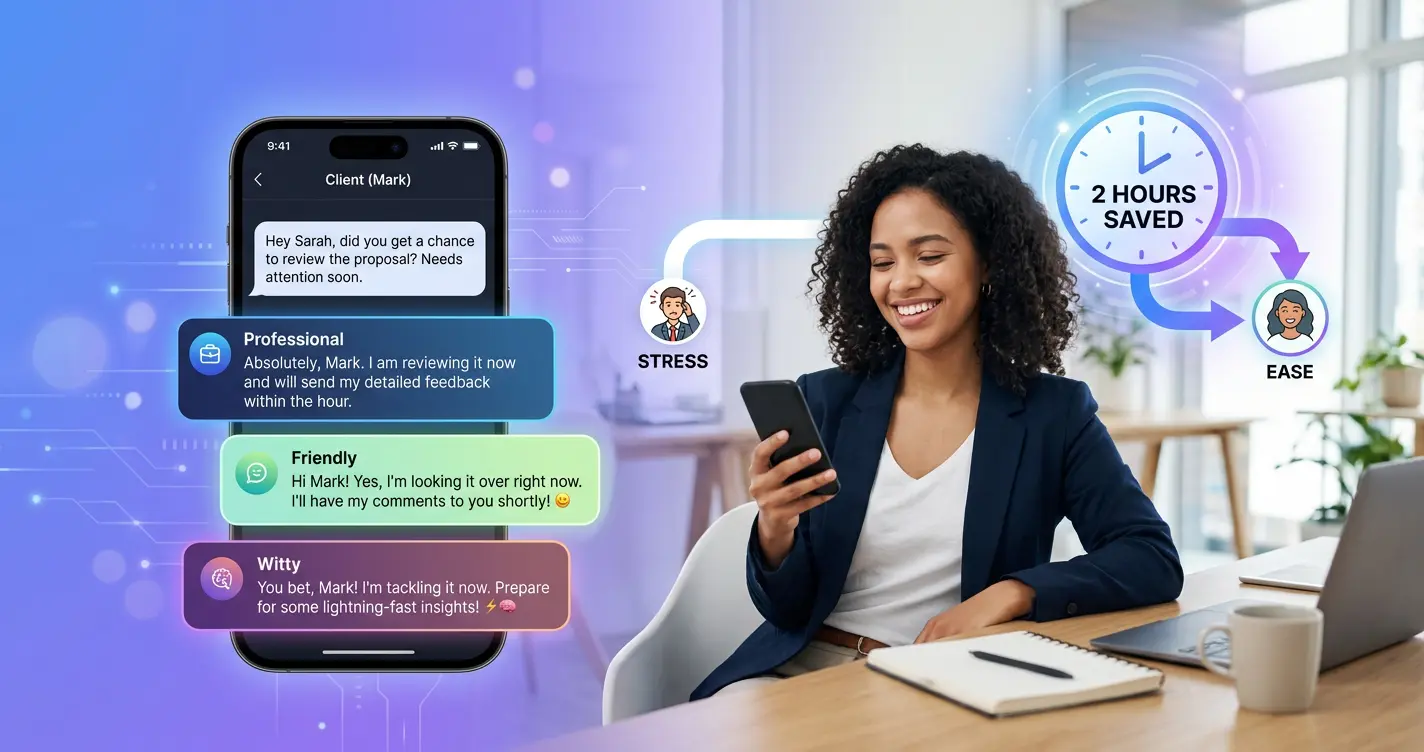
- Pick a tone — Professional, Friendly, Witty, Empathetic, or any of the 13 available tones
- Get 3 replies instantly — each one slightly different in approach
- Copy the one you like and send it
That’s it. What used to take 5 minutes of deliberation now takes 5 seconds of choosing.
What makes it different
There are a lot of AI tools out there. Here’s why ReplyCraft is built specifically for the way we actually message in 2026.
13 tones for every situation
Not every conversation needs the same voice. ReplyCraft gives you 13 distinct tones:
- Professional — for work conversations where you need to sound sharp
- Polite — respectful and warm, great for people you don’t know well
- Friendly — casual and natural, like talking to someone you’re comfortable with
- Witty — clever and funny without trying too hard
- Empathetic — when someone needs support, not solutions
- Enthusiastic — for matching someone’s excitement or celebrating wins
- Flirting — playful and charming, walks the line perfectly
- Sarcastic — for your inner circle who gets the humor
- Gen Z — slang, vibes, and internet energy
- Optimistic — bright and encouraging
- Persuasive — when you need to make your case
- Critical — direct and honest without being harsh
- Romantic — warm and heartfelt for the people who matter most
One tap to switch between them. Same message, completely different reply.
Works with any messaging app
ReplyCraft doesn’t care where your messages live. You can paste text into the app or use your phone’s share function to send messages directly from WhatsApp, Telegram, Instagram, or any other app. No integrations to set up, no permissions to grant. It just works.
Contacts with personalized defaults
You can save your frequent contacts in ReplyCraft and assign a default tone to each one. Your manager always gets Professional. Your best friend gets Gen Z. Your partner gets Romantic.
When you open a conversation, the tone is already set. One less decision to make, dozens of times a day.
Conversation Intent — your secret weapon
This is the feature that changes the game. You can set a goal for any contact — something you’re trying to achieve in that conversation.
“Convince her to come for a movie this weekend.” “Get the team to agree on the Q2 budget.” “Ask if he’d be open to freelancing for us.”
Once you set an intent, every reply suggestion works toward that goal — subtly, naturally, and without being pushy. If the other person isn’t interested, the AI reads the room and backs off. It’s like having a conversation coach who actually understands social cues.
Your history, saved and searchable
Every reply you generate is saved locally on your device. Need to remember what you said to a client last week? Search for it. Want to reuse a great reply? It’s right there. Your entire messaging history in one place, organized and easy to find.
Privacy that’s actually private
Nothing — and we mean nothing — is stored in the cloud. Your messages, your contacts, your intents, your reply history — it all stays on your device. No servers logging your conversations. No data being sold. Your messages are yours.
Real scenarios where it saves your sanity
Still not sure if you’d actually use this? Here are some situations where ReplyCraft turns “what do I say?” into “which of these three great options do I pick?”
Your boss at 6 PM: “Hey, can you handle this by tomorrow morning?” You’re annoyed, but you can’t say that. ReplyCraft gives you a Professional reply that sets a boundary without burning a bridge.
Your crush: “haha yeah maybe we should hang out sometime” Is that a real invitation or just small talk? ReplyCraft gives you a Flirting reply that keeps things moving without overcommitting.
A friend going through a breakup: “I just don’t know what went wrong” You want to be supportive but don’t know the right words. ReplyCraft’s Empathetic tone finds them for you.
A client pushing back: “We’re not sure this fits our budget” ReplyCraft’s Persuasive tone helps you reframe the conversation without sounding desperate.
These aren’t hypothetical. These are the messages that show up on your phone every single day.
Free to start, unlimited when you’re ready
ReplyCraft gives you 20 free replies per day. That’s enough to handle your trickiest conversations without spending a rupee. For most people, 20 is plenty.
If you find yourself reaching for it more often — and most people do — there’s a Premium plan that unlocks unlimited replies. But there’s no pressure and no paywall blocking core features. The free tier is genuinely useful, not a teaser.
Stop staring at the screen
Two hours a day is a lot of time to spend on messages. You’re not going to stop texting — nobody is. But you can stop overthinking every reply, stop agonizing over tone, and stop sending messages that don’t say what you actually meant.
ReplyCraft AI won’t text for you. But it’ll make sure that when you do text, you sound exactly like you want to — every single time.